Postgres versions every row. So why did I add a version column?
Just a few days ago, setting up a new project, I added one line to a table in my auction app and wrote a note beside it saying why:
version: integer('version').notNull().default(0)The note said the column was there so that a late bid and the job that closes the auction could not overwrite each other’s work.
I had no evidence for that. I had never seen the collision happen in this app or any other. The line was there because of a habit (a polite way of saying unproven).
So two days later, I staged the incident myself.
Postgres already versions everything
Here is what I half knew when I wrote that column, and had never thought about properly.
Postgres keeps every old version of every row.
When you change a row, Postgres does not reach in and edit it. It writes a whole new copy somewhere else and leaves the old one sitting where it was. A delete does not remove anything either. It marks the row as no longer interesting and walks away.
The manual says so in its opening line:
“In PostgreSQL, an UPDATE or DELETE of a row does not immediately remove the old version of the row.”
I wanted to see it rather than take it on faith. Every row carries a hidden field called ctid, which is roughly its physical address. It tells us which page of the file it lives on, and where on that page. So I read the address, changed the row, and read the address again.
row version BEFORE update: { ctid: '(0,1)', xmin: '747' }
row version AFTER  update: { ctid: '(0,2)', xmin: '748' }
As far as my app is concerned that is one row, but it has moved to a different spot on the disk, and the old version is still sitting at the first one.
So the database I was carefully adding a version column to had been versioning everything all along, without being asked.
What all that copying buys you
Postgres keeps the old versions so that everyone reading can be handed a snapshot instead of a live view.
“each SQL statement sees a snapshot of data (a database version) as it was some time ago, regardless of the current state of the underlying data.”
In plenty of databases, readers and writers take turns. If someone is halfway through changing a row, your read waits. Postgres does not make you wait. It hands you a snapshot of how things looked the instant you asked, and lets the writer carry on behind it. The manual puts it in one line: “reading never blocks writing and writing never blocks reading.”
That is a big deal, and it’s why your database does not seize up when someone runs a big report at 9am on a Monday.
The bill: a table that grows when you empty it
Old snapshots pile up though. Every update you have ever run left one behind, and the space they take up is significant.
So something has to clear out the versions nobody needs any more. That job is called VACUUM:
“eventually, an outdated or deleted row version is no longer of interest to any transaction. The space it occupies must then be reclaimed for reuse by new rows, to avoid unbounded growth of disk space requirements.”
This is the bit that catches people out. You delete a million rows, you check the table, and it has not got any smaller. Nothing is broken: you have just found out that “delete” meant “stop showing me these,” and the cleanup happens later.
The incident, built on purpose
So now, to the staged incident. The collision I was guarding against is the part I could never get to happen on its own, so I built it.
An auction has a deadline. When it passes, a background job wakes up, closes the auction, and records who won. That job does not know or care what any person is doing at that moment.
This is the moment I wanted to simulate: Alice places a $150 bid at the same instant the job wakes up.
Both of them read the auction first, and both get the same snapshot: version 0, with no high bidder yet.
- Alice’s bid writes: high bid is now $150, high bidder is Alice.
- The closing job writes: this auction is closed, and the winner is whoever the high bidder was in the snapshot I am holding. Which was nobody.
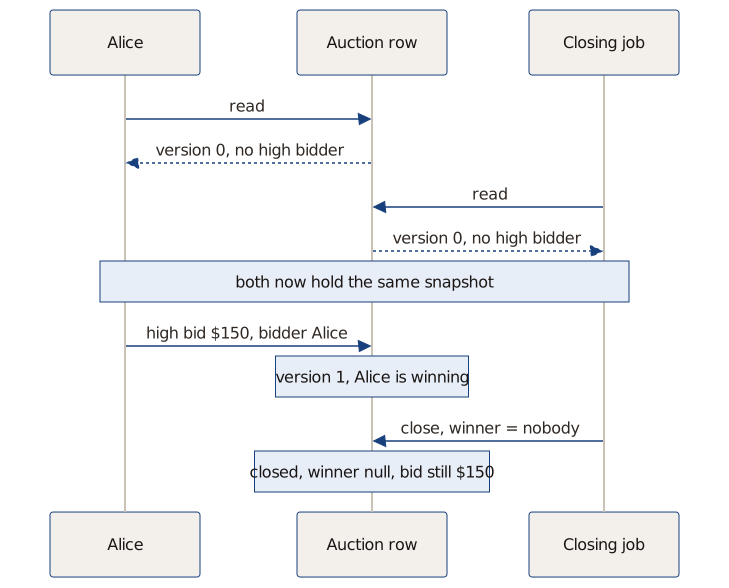
I ran it against a real Postgres database. Whether two writers can walk over each other is a property of the database, and a fake one would agree with whatever I expected. This is the row I got back:
final row: { status: 'closed', high_bid_cents: 15000, winner_id: null, version: 1 }Alice’s $150 bid is sitting right there in the row, and the auction closed with no winner.
Postgres accepted both writes without an error or a warning, and rolled nothing back. It will give that row to anyone who asks: an auction that someone bid on, closed, with nobody winning it.
You do not have to take my word for any of this. The whole thing is a small repo you can run in about five minutes: postgres-lost-update. It ships with the bug working and the fix missing, so you can watch the auction lose Alice’s bid on your own machine, then add the one condition that saves it.
(Adding the condition is a challenge for you. If you want to do it, clone the repo and try it out! The answer is below.)
Two different jobs
The versioning did not save me, because saving me was never the job it was doing.
Postgres versions rows so it can work out what each reader is allowed to see. Working out which of two writers should win is a separate job, and nothing in the version machinery does it.
The snapshot is honest about the past, and it can tell you nothing about what somebody else is about to do a millisecond from now.
The manual describes the default setting most apps run on, and it is worth reading closely. When a second writer arrives, it waits for the first to finish, and then “it will attempt to apply its operation to the updated version of the row.” It applies its operation. Nothing in there checks whether the operation still makes sense.
A database that tracks every version of every row sounds like a database that will stop two people changing the same thing at once. But Postgres only does the tracking part.
The guard is the WHERE clause
The part I did not expect came out of watching the failing run.
Look at the broken row again: version: 1.
My version column did move. Both writers read version 0, both wrote version 1, and the number ended up exactly where it should be, having protected nothing at all.
The guard is the condition you attach to the write: change this row only if the version is still the one I read. That is the whole mechanism.
UPDATE auctions
   SET status = 'closed', winner_id = $1, version = $2
 WHERE id = $3
   AND version = $4    -- the version I read a moment ago
That last line is the entire fix. Without it, the closing job writes whatever it decided. With it, the write only counts if nobody moved the row while the job was deciding.
Here is the same race with those words added:
rows matched by the guarded update on first try: 0
final row: { status: 'closed', high_bid_cents: 15000, winner_id: 'alice', version: 2 }
Zero rows matched, and that zero is what makes the fix work. The closing job asked to change a row that no longer existed in the shape it remembered. So nothing was written, and the job found out its snapshot was stale. It looked again, saw Alice, and closed the auction against what was true.
I have written that column into three projects now, mostly on instinct, and I would have told you the version number was doing the work. Six words in a WHERE clause were doing it.
You only find that by making the bug happen. The bug I was protecting against is a fraction of a second wide, and needs two writers reaching for the same row. It will never show up in a demo, because it waits until you have customers.
I wrote that line out of habit and could not have told you why it worked. Now I can.
Changes to this post
Published.
Get the next one straight to email. Free.
No trackers. One email when there's a new post, nothing else (I dislike a cluttered inbox as much as you do). Unsubscribe anytime.